
Buying
3PL WMS vs Generic Warehouse Software
Generic warehouse software assumes one owner. A 3PL has many. Where that gap costs money, and nine questions to ask any 3PL WMS vendor before you sign.
Guides

A 3PL needs a system that treats the client as part of every record, keeps inventory per client, raises charges from the work done and shows each client only its own data. The page is about the questions, not about any product.
A warehouse that stores its own goods has one owner, one set of rules and one set of books. A 3PL has none of that. Ten clients can share a floor, and each expects to be treated as if it were the only one.
That difference should decide which system you get. These are the places it shows up.
In a single-owner warehouse nobody asks who owns a pallet. In a 3PL it is the first question every day.
A system for 3PL work has to treat the client as part of the record, not a note in a comment field. Every item, pallet, order and charge belongs to someone, and the system should refuse to mix them up.
Test it in the demo. Ask the person presenting to set up two clients that sell a product with the same SKU code, then receive stock for both. If the screen cannot tell them apart, you will be tidying that mess by hand for years.
A count of what is on the shelf is not enough. You need to know what is on the shelf for each client, in which location, in what condition, and what has happened to it.
Look for these:
A hypothetical example: a client says they sent 400 units and your system shows 380. If the history shows a receipt of 400, a damage hold of 20 and a photo from the dock, the argument takes two minutes. If it shows only "380", it takes two weeks.
This is where a 3PL differs most from any other warehouse. Your product is the work, and you only get paid for work you recorded.
Each client has their own rates. One pays per pallet per month. Another pays per cubic foot per week. A third has a minimum charge, a kitting fee and a rule about weekend receiving. The system has to hold all of that and apply the right rule to the right client without anyone checking a spreadsheet.
The better design raises charges from the work itself. A receipt on the dock produces a receiving charge, and a pick produces a handling charge, with nobody needing to remember. We cover why that matters in why a 3PL needs a system built for 3PL work.
Storage is the charge people argue about most, because it runs quietly in the background. A pallet arrives on the 12th, moves on the 20th and leaves on the 28th. Do you bill by calendar month, by anniversary date, or by a daily snapshot?
Ask which of those the system supports, and ask to see a real calculation for a client with a mid-month receipt. Whichever method you choose, you should be able to explain the number to the client in one sentence.
Clients will ask where their stock is. If the answer is always an email from your team, you are paying staff to read a database aloud.
A client view that shows their own stock, open orders and invoices, and nothing about anyone else, removes many of those emails. It also builds trust, because the client sees what you see.
The word that matters is "scoped". A client must only ever see their own data. Ask how the system guarantees it, because "yes" alone proves nothing.
Receiving is where a 3PL wins or loses on accuracy. Clients send goods in odd formats, with wrong notices and missing labels. The system has to cope with deliveries that have a notice and deliveries that do not, with short, over and damaged goods recorded with photos at the dock, and with putaway rules that differ by client, such as reserved space, temperature zones and segregated product.
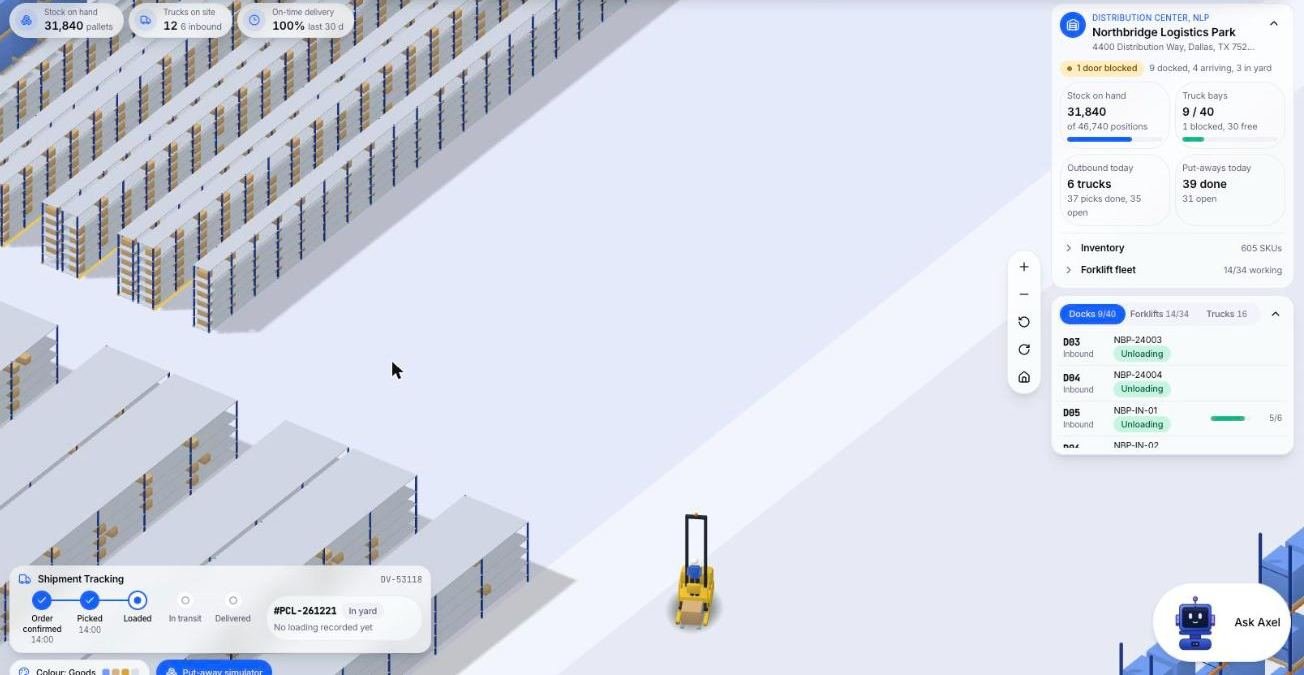
The next image is the rack view from the Microsive demo platform, using demo data, showing a forklift carrying a put-away task between rack rows.
If every client's goods go to the next empty slot, you pay for it at pick time. Ask whether putaway can follow rules you set, and whether staff can override them with a recorded reason.
Do not judge a system by its feature list. Almost every product lists the same words. Judge it by your own work.
The list of leftover workarounds is the real answer. If the leftovers are small edge cases, a standard product may suit you well. If they are your daily work, look at something shaped around it. We explore that decision in is Cargohold the right system for your 3PL, which says plainly when a subscription product is the better choice.
Print this and take it to every demo.
Cargohold is the system Microsive makes. Its billing page describes charges built from events on the warehouse floor, each traceable to the event that created it. Its pricing page describes a one-time custom build, no per-seat, per-truck or per-client fees, with the code and the data owned by the customer. Whether that suits you depends on how you answer the checklist above, and Cargohold's own build vs buy guide lays out the trade. We do not claim it is right for everyone.
A single owner warehouse has one owner, one set of rules and one set of books. A 3PL has many clients on one floor, each expecting to be treated as the only one, so every item, pallet, order and charge has to belong to a client.
Write down three messy examples from last month, such as a disputed count, a forgotten charge and a special report. Ask to see each done with your data, count the workarounds, ask what happens at ten more clients, and ask who owns the data and how you get it out.
Ask which method the system supports: calendar month, anniversary date or a daily snapshot. Ask to see a real calculation for a client with a mid month receipt. You should be able to explain the number to the client in one sentence.
A client view of their own stock, open orders and invoices removes many emails and builds trust. The word that matters is scoped: a client must only see their own data, so ask how the system guarantees that.
Deliveries with and without a notice, short, over and damaged goods recorded with photos, and putaway rules that differ by client, such as reserved space, temperature zones and segregated product. Staff should be able to override a rule with a recorded reason.
Buying
Generic warehouse software assumes one owner. A 3PL has many. Where that gap costs money, and nine questions to ask any 3PL WMS vendor before you sign.
Cargohold
What Cargohold does for 3PLs, who it suits, and when you should buy subscription software instead. This is not a ranking.
Roles
What a 3PL manager does: answering for other companies' goods inside your building. A typical day, who they deal with, and the jobs that are not theirs.